Houdini Swap
Overview
Houdini Swap is a non-custodial cross-chain swap aggregator that enables users to swap supported crypto assets across networks through a single interface.
With support for 100+ chains and 4,000+ tokens across its platform, Houdini brings multiple networks, liquidity sources, and swap providers into one interface, simplifying cross-chain swaps without requiring users to navigate separate exchanges, bridges, or other DeFi tools themselves.
For Shardeum, Houdini provides cross-chain access to SHM through supported assets, networks, and available swap routes.
Swap SHM with Houdini
Select the source asset and network you want to use, choose SHM on Shardeum as the destination asset, enter your Shardeum wallet address, and review the available routes and live quote.
For the SHM routes supported, you don’t need to connect your wallet or approve and sign the swap through the Houdini interface. Instead, Houdini generates a deposit address for the order. You send the selected asset to that address from your wallet or exchange, and Houdini automatically handles the routing and delivers the resulting SHM to the Shardeum wallet address you specify.
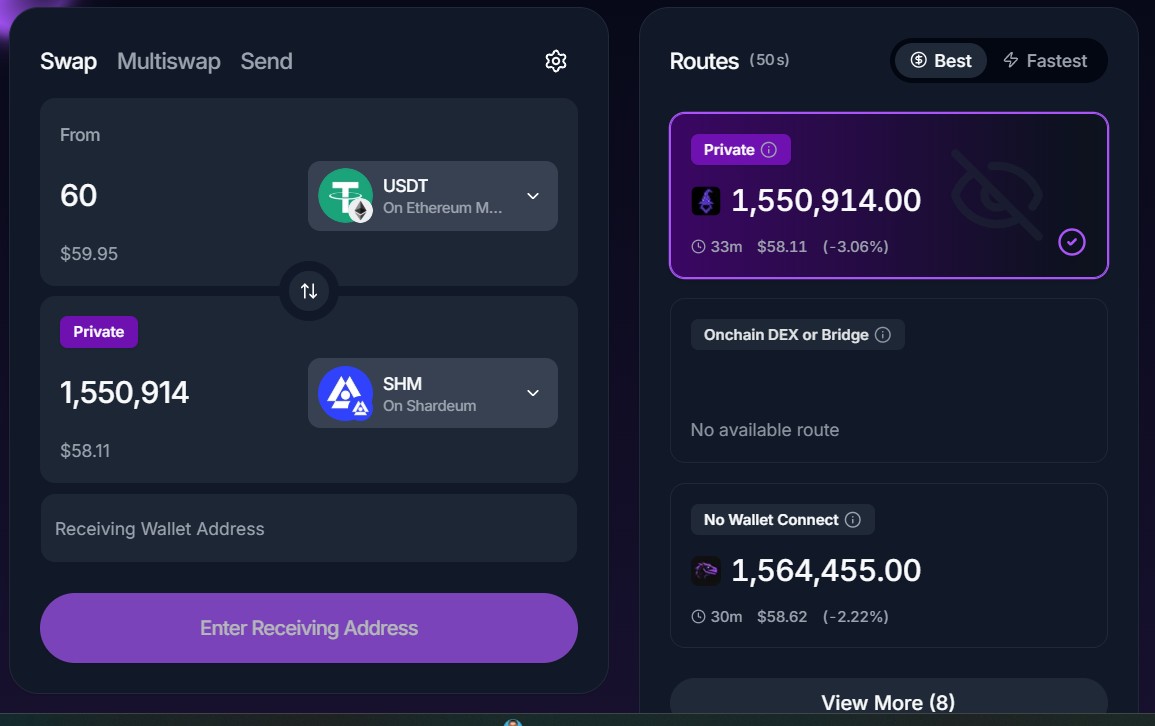
SHM Swap Routes
Houdini offers two primary routes for swapping SHM.
1. Private Swap
Private Swap is Houdini’s privacy-focused cross-chain route. Houdini automatically routes the transaction through two separate non-custodial exchange providers via an intermediary asset. The additional routing is designed to reduce the direct onchain link between the source and destination wallets. Because of these additional routing steps, Private Swap may take slightly longer (up to ~30 minutes) and cost slightly more than the ‘No Wallet Connect’ route
2. No Wallet Connect
Under the No Wallet Connect route, Houdini routes the swap through a supported exchange provider that receives the source asset, converts it into SHM, and sends the resulting SHM to your Shardeum wallet. Because the route is simpler than ‘Private Swap’, it is typically faster (up to ~15 minutes).
Note: Available routes, minimum and maximum amounts, rates, fees, and estimated completion times depend on the selected asset, network, amount, and provider. Always review the live quote before proceeding.
Integrate Houdini Swap in Your Applications
Developers building on Shardeum can use Houdini’s infrastructure to add cross-chain swap functionality to their applications.
Houdini provides:
- APIs for building custom swap experiences
- An embeddable swap widget
- Token and network discovery
- Route and quote retrieval
- Swap-status tracking
This can allow the applications building on Shardeum to offer users access to supported cross-chain swap routes without requiring them to build its own routing infrastructure.
Please visit Houdini Swap's API & Integration resources
Safety
Before initiating a swap:
- Verify the source asset and network.
- Confirm your Shardeum destination address.
- Send only the asset and network specified in the order.
- Use the deposit address generated for that specific order.
- Review the live rate, fees, expected output, and estimated processing time.
- Do not send funds to an expired order or reuse an old deposit address.
Sending an unsupported asset, using the wrong network, or entering an incorrect destination address may result in loss of funds, and recovery may not always be possible.
Support & Resources
- For issues involving a Houdini Swap order, contact Houdini Swap Support through the help widget on its website or its official Telegram support bot
- How to Swap Into SHM blog tutorial & video tutorial