ShardeumShardeum Logo
Connect to ShardeumDelegate NowGithubPartnership EnquiriesTestnet Quickstart
Shardeum Documentation
What is Shardeum?Network Endpoints & ExplorerEVM Overview
IntroductionInstallingCreate AccountAdding Shardeum Network to MetaMaskSending & Receiving SHM
Supported Wallets
Developers
Testnet Quickstart
Deploy Smart Contracts
Deploy dApps
JSON-RPC GuideNetwork Interfaces
Node TypesRun a Full NodeRun a Validator NodeAdvanced OperationsRun an RPC NodeDelegate SHM
Node Setup OverviewRun an RPC NodeRun a Full NodeRun a Validator Node
Ecosystem
Nordstern.Finance
WalletsMetamask

Create Account

1, In order to create a new account, click on the account icon on the top right of MetaMask:
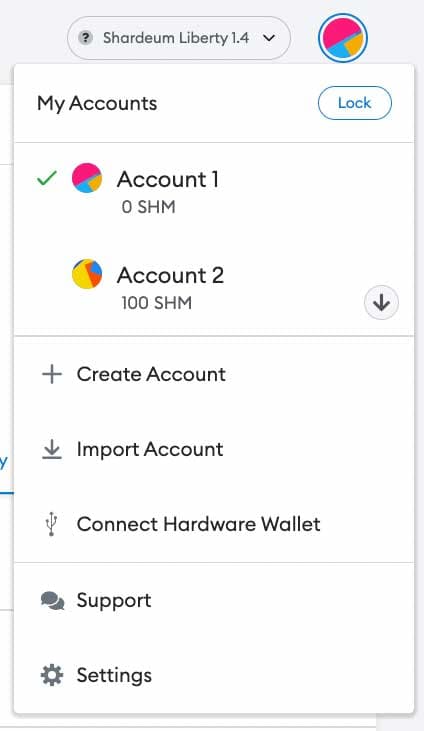
create_account_1

2, Provide an account name and then click the Create button.
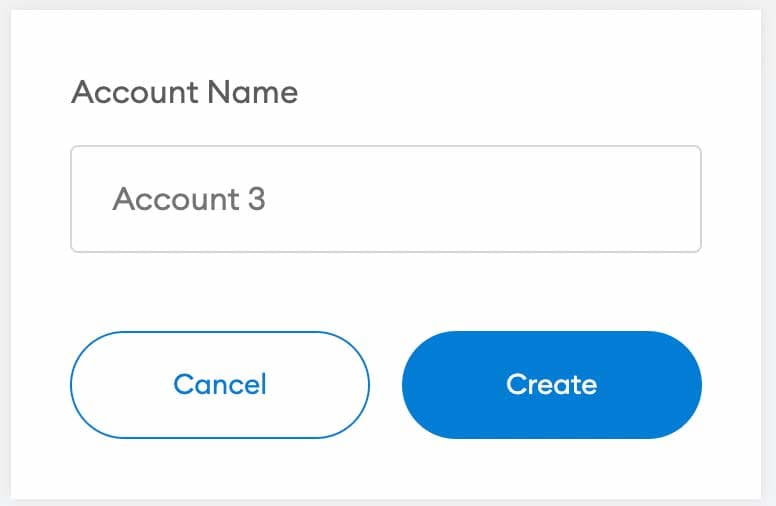
create_account_2

Previous

Installing

Next

Adding Shardeum Network to MetaMask

On this page

No Headings

Footer

Company name

EVM L1 for Real-World Asset Tokenization

© 2026 Shardeum, Inc. All rights reserved.

XGitHubYouTube

General

  • Home
  • Ecosystem
  • Testnet Quickstart
  • Blog

Community

  • Telegram
  • Discord
  • Twitter
  • GitHub

Resources

  • Explorer
  • Whitepaper
  • FAQs
  • Brand Assets
  • Public Drive

Contact

  • General Enquiries
  • Partnership Enquiries
  • Report Bugs
  • Report Security Issue